
Client-side QA tooling
Generate test files.
Exactly the size you need.
Create PDF, JPG, PNG, JSON, CSV, MP4, WAV, and other test fixtures directly in your browser. No uploads. No accounts. No server required.
File type
Target size
Filename
How It Works
1. Select Format
Filter by category (Text, Documents, Media, …) then pick PDF, JPG, JSON, WAV, and more.
2. Set Size
Optional exact size in bytes, KB, or MB — perfect for boundary and upload-limit tests.
3. Optional Body
For text formats, optionally paste JSON, CSV, or HTML; binary types use embedded templates.
4. Download
Save the file securely. No server upload is ever involved.
The primary workspace
Generate a fixture, then test it.
Create a test file
02 / Configure
Set an exact byte target and optional text content.
One-click presets
Common QA sizes (limits are illustrative — always verify against your vendor docs).
Hard cap ~512 MiB per generation (browser memory).
Choose a file type to get started.
Chrome extension
Test files from your toolbar
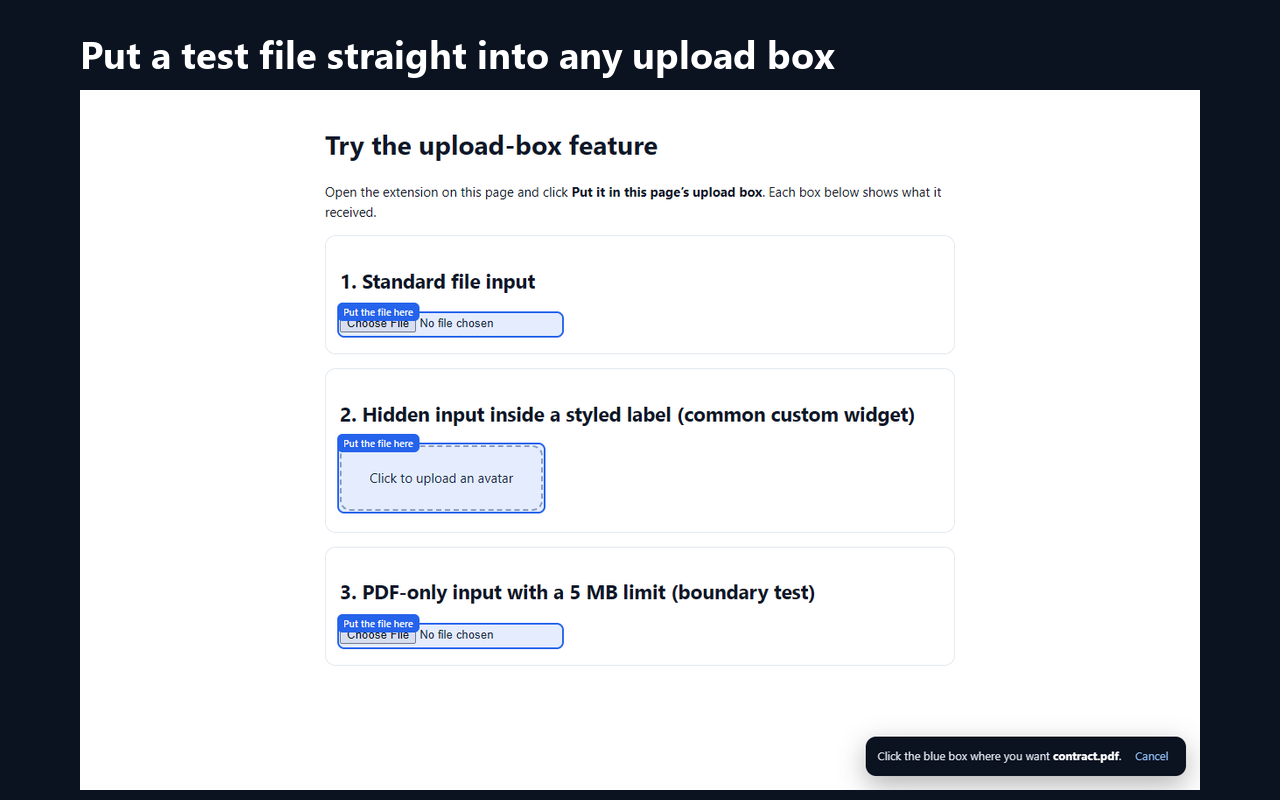
The free Dummy File Generator extension makes the same exact-size files in two clicks and can put one straight into the upload box of the page you are testing — no download, no file picker. Works in Chrome, Edge and Brave.
100% Client-Side
Files are generated purely in JavaScript. Nothing you create is uploaded, so it is safe to use on locked-down or NDA-bound machines.
Instant Speed
Direct Blob creation bypasses network latency. A 100 MB file is ready in about a second on a typical laptop.
28 Formats
PDF, DOCX, images, media, archives, data and code files. Validate your application's file type detection logic strictly.
Ready-made sizes
Popular test files
- 1 MB PDF
- 5 MB PDF
- 10 MB PDF
- 25 MB PDF
- 2 MB JPG
- 10 MB JPG
- 5 MB PNG
- 20 MB MP4
- 100 MB MP4
- 5 MB MP3
- 1 MB DOCX
- 50 MB ZIP
- 100 MB ZIP
- 1 MB CSV
- 10 MB CSV
- 1 MB JSON
- 100 KB JSON
- 1 MB TXT
Not sure what size to test? See the upload limits of Gmail, WhatsApp, Discord, Nginx, PHP and 40+ more.
Quick answers
- How do I create a dummy file of an exact size?
- Open dummyfilegenerator.com/generator, pick a format (for example PDF), tick “Exact file size”, enter the size in bytes, KB or MB, and click Generate. The download is exactly that many bytes. A 5 MB PDF is one click away at /generator?preset=pdf-upload-5mb.
- Is Dummy File Generator free, and are my files uploaded anywhere?
- It is free with no account. Files are built in your browser with JavaScript and saved directly to your device; nothing is sent to a server.
- Which file types can it generate?
- 28 formats: TXT, MD, VTT, HTML, PDF, DOCX, SVG, JPG, PNG, GIF, WEBP, MP3, WAV, MP4, WEBM, JS, TS, CSS, SCSS, JSON, CSV, XML, SQL, ZIP, YAML, INI, ENV, TOML. PDF, DOCX, ZIP, JPG, PNG, GIF, WebP and WAV files are structurally valid and open in normal viewers.
- What is the largest file it can make?
- 512 MiB (536,870,912 bytes) per file, because the file is assembled in browser memory. That covers common upload limits such as 5 MB, 10 MB, 25 MB and 100 MB.
- Is 5 MB 5,000,000 or 5,242,880 bytes?
- Both are used. Binary (MiB) 5 MB = 5,242,880 bytes; decimal 5 MB = 5,000,000 bytes. Test both, plus one byte either side of your real limit. The file size calculator at /tools/file-size-calculator converts between them.
More in the full FAQ.
What is Dummy File Generator?
Dummy File Generator is a free test file generator and dummy file creator for QA engineers, testers, and developers. It helps you build sample files of specific sizes and formats (PDF, JPG, JSON, CSV) to validate upload limits and MIME checks in your applications — as a true file generator by size, not approximate downloads from the web.
Popular testing scenarios
- 5 MB dummy PDF upload test — boundary value analysis for storage tiers.
- Exact-byte file generator — pin payloads like 1,048,577-byte JPEGs for API quotas.
- Large padded CSV — ETL and import benchmarks without PHI.
- PDF format guide — structure, MIME, and when to pad dummy PDFs.
Who is this for?
- QA Testers: Verify upload limits (e.g., rejecting files > 5MB).
- Developers: Test MIME-type validation logic.
- System Admins: Check storage behavior and disk quotas.
Why Developers Use It
Finding a "clean" 5 MB PDF or an exactly 1,048,577-byte JPG for testing is surprisingly hard. Downloading random files involves security risks. Our tool generates these files locally in your browser, ensuring 100% safety and privacy.
Supported Formats
We support generating legitimate file headers for text, documents, images, audio, and video containers used in upload QA:
- Text & data: TXT, JSON, CSV, XML, YAML, SQL, Markdown
- Documents: PDF, DOCX, HTML
- Images: JPG, PNG, GIF, WebP, SVG
- Archives: ZIP
- Media: MP3, WAV, MP4, WebM (synthetic shells for MIME/size tests)
Editorial content on this site
Beyond the generator, we maintain long-form resources so teams can learn why and when to use dummy files: step-by-step guides, searchable format explainers, intent-based scenario playbooks with shareable URLs, an engineering blog, and a glossary of MIME and upload terminology. That editorial layer is the primary publisher content; the generator is a companion utility that runs entirely in your browser.
Chrome extension
The same generator is available as a free Chrome extension. It makes exact-size test files from the toolbar, a right-click menu or Alt+Shift+D, and can attach a file directly to the upload box of the page you are testing. Install it from the Chrome Web Store; it also works in Edge and Brave.
Privacy & compliance
Because generation is client-side, you can use Dummy File Generator on locked-down laptops and in environments where uploading sample data to unknown SaaS tools is prohibited. Read our privacy policy for details on analytics and advertising technologies.